Twitch Chat Integration & 0.6.6.1
Lavibus Games
Apr 11
Hello runners!
Hope you’re all having an awesome springtime!
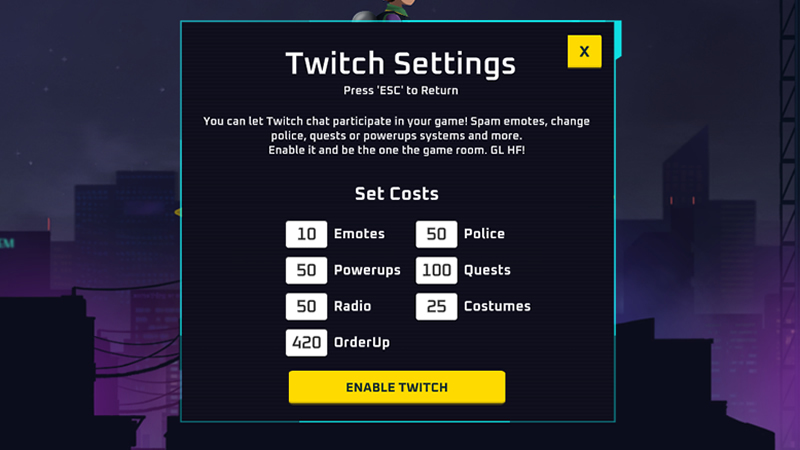
Twitch Chat Integration
If you're a streamer, you can now enable Twitch integration directly from the main menu. Once enabled:
- You’ll be redirected to Twitch to authenticate.
- You must be the one starting the game room.
- When the match begins, reward actions will appear on your channel, and your viewers can start redeeming them instantly.
Twitch Chat can influence the game in multiple ways:
- Emotes - Viewer emotes + usernames appear in-game
- Quests - Temporary buffs/debuffs
- Police - Temporary buffs/debuffs
- OrderUp - Viewers request the next order
- Appearance - Hats get scrambled
- Radio - Chat takes over the radio
- Transaction Time - Doubles waiting time on quest platforms temporarily
- PowerUps - Temporary boosts
You can also customize the cost of each category when enabling Twitch Chat.
Important Notes:
- Twitch actions disappear on their own when the game ends.
- They won’t reappear unless you start a new match.
- If you ALT + F4 mid-game and actions remain active on your twitch channel, go back to main menu and disable Twitch to clear them out.
Some actions affect only the streamer (like appearance or radio), while others impact the entire city/game (like police behavior). This is why the streamer must be the one who starts the room.
In the future, we may introduce these events as random gameplay elements, but for now they’re exclusive to Twitch Chat!
Build 0.6.6.1
- Twitch Chat Integration added
- Performance improvements on Steam Deck
- New community quests from NextFest players
- Balanced quests and overall economy
- Improved logging system
On behalf of our team (Jamayk, RustyStorm & MrPhilipJoel) - thank you!
This announcement was originally published by Lavibus Games on Steam on Apr 11, 2026.
Open the original on Steam